Building Better Prompts
This section covers what goes into your prompt—the content and structure of your request. Getting this right is the foundation of effective AI-assisted coding.
🎯 Be Detailed, Specific, and Avoid Ambiguity
The clearer your request, the better the Python code you’ll receive. Avoid vague instructions and spell out exactly what you want.
Include these key elements in your prompts:
- Goals - What specific outcome do you want? (e.g., “create a bar chart showing monthly sales trends”)
- Constraints - Any limitations or requirements? (e.g., “use only data from 2023”, “exclude missing values”)
- Required libraries - Specify which tools to use.
- Approach - How should the problem be tackled?
- Data structure - Many AI models can’t access CSV files, pasting the output of
df.info()ordf.head()can give important context to your AI.
# ❌ Static code example (not runnable)
import matplotlib.pyplot as plt
plt.bar([1,2,3], [4,5,6])
plt.show()
Why this is bad:
- Ambiguous: Doesn’t specify which data file or what type of chart.
- Incomplete: Missing data loading, no column names specified.
- No Labels: Chart has no context, axis labels, or title.
- No Library Specified: Doesn’t mention Pandas or Matplotlib.
# ✅ Static code example with clear documentation
import pandas as pd
import matplotlib.pyplot as plt

# Load the data
df = pd.read_csv('data/sales_data.csv')

# Create bar chart
plt.figure(figsize=(8, 5))
plt.bar(df['Month'], df['Sales'], color='steelblue', label='Sales')
plt.xlabel('Month')
plt.ylabel('Sales ($)')
plt.title('Monthly Sales Report')
plt.legend()
plt.show()
Why this is good:
- Specific: Clearly defines the data file, chart type, and columns to use.
- Complete: Includes data loading, proper column references, and visualization.
- Well-documented: Chart has proper labels, title, and styling.
- Libraries Specified: Explicitly mentions Pandas and Matplotlib.
📚 Specify the Libraries You Need
Python has multiple data processing and visualization libraries. LLMs might default to JavaScript, use outdated libraries, or pick something you don’t have installed. Always be explicit about which tools you want to use.
Why this is problematic:
- No language specified: AI might respond with JavaScript, R, or Python
- No library specified: Could use Matplotlib, Plotly, Seaborn, or something else
- Version ambiguity: Might use deprecated methods from older library versions
- Compatibility issues: You might not have the suggested library installed
Why this works:
- Language explicit: Python, not JavaScript or R
- Libraries named: Pandas for data, Matplotlib for visualization
- Predictable output: You know exactly what tools the code will use
- Easy to run: You can verify you have the right libraries installed
If you’re using a specific library version, mention it! For example: “I’m using Pandas 2.0. Please use pd.concat() instead of the deprecated .append() method.”
🧩 Decompose the Problem
Large tasks can overwhelm an LLM. Instead of asking it to build your entire analysis in one go, break the problem into smaller steps that you can test individually.
Why this often fails:
- Too many steps: AI tries to do everything at once and makes mistakes
- Hard to debug: If something breaks, you don’t know which part failed
- Incomplete output: LLMs may skip steps or use placeholder code like “# … rest of logic here”
- No validation: You can’t verify each piece works before moving on
Prompt 1: “Load ‘sales.csv’ using Pandas and display the first 5 rows and column types.”
Prompt 2: “Clean the data: remove rows with missing values in ‘sales’ column and convert ‘date’ to datetime.”
Prompt 3: “Group by month and calculate total sales. Show the result.”
Prompt 4: “Create a line chart of monthly sales using Matplotlib.”Why this works better:
- Testable steps: Run and verify each piece before moving on
- Easy to debug: If step 3 fails, you know exactly where the problem is
- Build incrementally: Each prompt builds on confirmed working code
- Better results: Smaller, focused requests get more accurate responses
Think of it like building with LEGO bricks 🧱. Each step is a brick. Once the bricks are tested and solid, you can combine them into a larger analysis.
Decomposing problems is important as LLMs have context and output token limits — this limits how much they can process and generate at once. If your prompt is too large or your request too complex, the LLM may hallucinate incorrect or unfinished code.
Decomposing is additionally valuable as it increases your understanding of the problem and gives you time to reflect on how separate functions should work together.
What is Prompt Engineering ? 🛠️
Prompt engineering is the practice of designing and refining prompts to get the best possible output from an AI. It’s not just about what you ask, but how you ask it, taking into account:
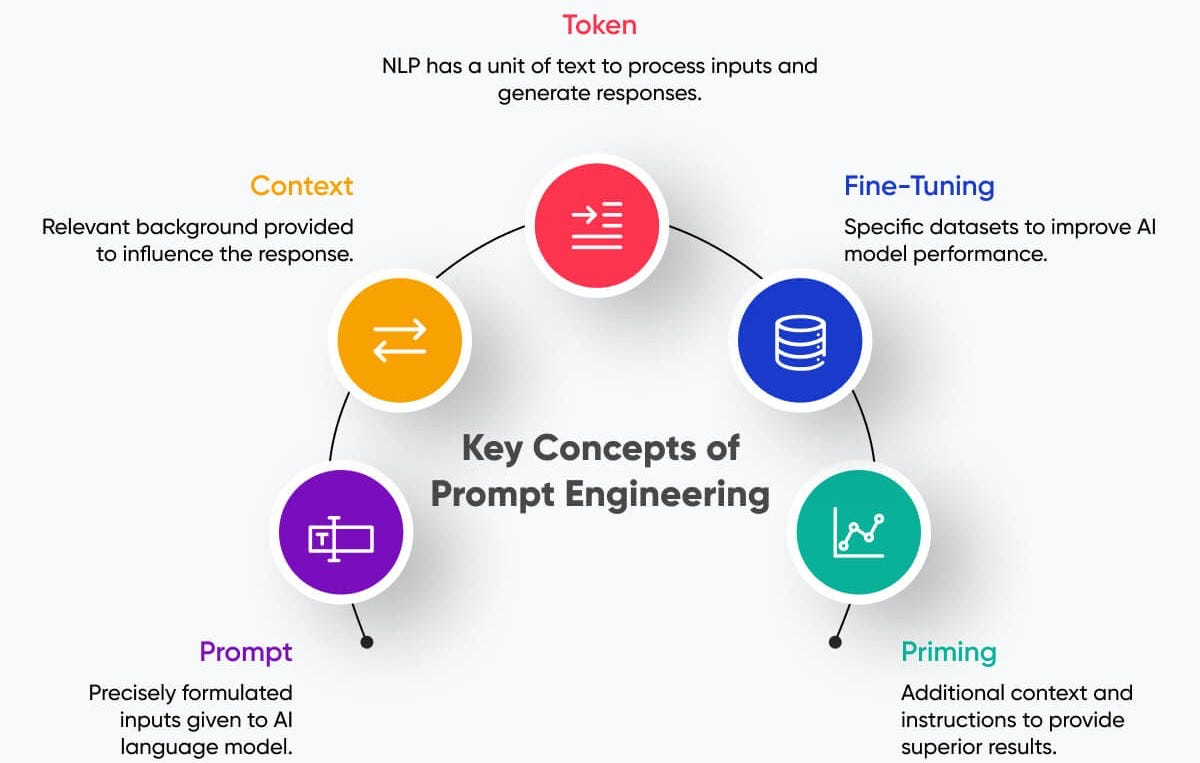
The 5 Steps of Prompt Engineering :
1. Prompt:The instructions or questions you give to the AI.
2. Context: The data, background, or previous conversation that helps the AI understand your goal.
3. Tokens: Be mindful of length; LLMs have limits on input and output tokens.
4. Fine-tuning: Adjusting the AI model (or using a specialized variant) to better handle your type of tasks.
5. Priming: Setting the AI’s expectations with examples or instructions before asking your main task.
By understanding these steps, you can craft more effective prompts, reduce ambiguity, and improve the accuracy of R code and analyses generated by the AI.